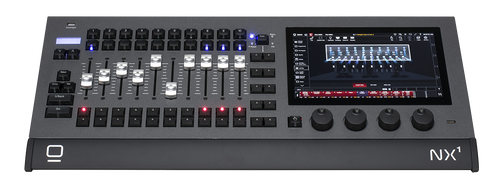
Choosing the right accessories for your DMX lighting console can make a huge difference in how smoothly your shows run. You might have the best console, but without the proper add-ons, you could be missing out on easier control and better results.
This guide will help you pick the exact accessories that fit your needs, saving you time and frustration. Keep reading to discover simple tips that will boost your setup and make your lighting control experience much better.

Credit: www.amazon.com
Understanding Dmx Lighting Consoles
DMX lighting consoles control stage lights and effects. They send signals to the fixtures. Knowing how they work helps you pick the right accessories.
This guide explains the basics of DMX consoles. It also helps you choose accessories that improve your setup and performance.
What Is A Dmx Lighting Console?
A DMX lighting console is a device that manages lighting fixtures. It uses the DMX512 protocol to send digital signals. These signals tell lights how to behave.
Key Features Of Dmx Consoles
- Multiple channel control for many lights
- Ability to create lighting scenes and effects
- Connectivity through DMX ports and USB
- Real-time control and programming options
These features affect what accessories you need. For example, more channels may require better cables and splitters.
Types Of Dmx Consoles
| Type | Description | Best For |
| Basic | Simple controls and fewer channels | Small shows and beginners |
| Advanced | Many channels and programmable features | Professional setups and large events |
| Software | Runs on a computer with a USB interface | Flexible setups and mixing with other software |
Choosing accessories depends on the console type. Each type needs compatible cables, interfaces, and power supplies.
Common Accessories For Dmx Consoles
- DMX cables to connect fixtures
- Signal splitters to extend control
- Power supplies for stable operation
- Backup batteries for uninterrupted use
- Mounting racks or cases for protection
Choosing the right accessories keeps your console safe and working well. It also helps you manage your lighting system better.
Credit: betopperdj.com
Essential Accessories
Choosing the right accessories for your DMX lighting console is important. These accessories help you connect, power, and extend your lighting setup.
Here are some essential accessories to consider for smooth operation and better control.
Cables And Connectors
Cables and connectors link your lighting console to lights and other devices. They carry the DMX signal for control.
Choose cables that are durable and fit your equipment’s ports. Common types include XLR connectors and RJ45 adapters.
- DMX XLR cables (3-pin or 5-pin)
- Ethernet cables for Art-Net or sACN
- Connector adapters for different devices
- Proper length to avoid signal loss
Signal Boosters
Signal boosters help maintain strong DMX signals over long cable runs. They prevent flickering and signal drops.
Use boosters if your setup covers large areas. They amplify the signal to reach all connected lights evenly.
- DMX repeaters to regenerate signals
- Signal amplifiers for long distances
- Ensures consistent lighting control
- Easy to install in the DMX chain
Power Supplies
Power supplies give electricity to your DMX console and connected devices. They ensure stable and safe power flow.
Pick power supplies that match your equipment’s voltage and current needs. Reliable power prevents damage and keeps shows running.
- Check voltage and amperage ratings
- Use regulated power supplies
- Consider backup power options
- Match connectors to your console
Choosing The Right Cables
Choosing the right cables is important for your DMX lighting console setup. The cables connect your devices and carry signals without interruptions.
Good cables ensure stable lighting control and reduce technical problems during shows or events.
Cable Length Considerations
Pick cables that are long enough to connect all your equipment without stretching. Too short cables can cause tension and damage the connectors.
- Measure the distance between your console and lights before buying cables.
- Choose cables slightly longer than needed to allow movement.
- Avoid very long cables that can weaken the signal.
- Use signal boosters if you need to extend cables beyond standard lengths.
Cable Quality And Durability
High-quality cables last longer and provide reliable signal transmission. Look for cables with strong connectors and good insulation.
| Feature | Why It Matters |
| Connector Type | Secure connection prevents signal loss |
| Shielding | Protects from electrical interference |
| Material | Durable cables resist wear and tear |
| Flexibility | Easy to handle and install |
Selecting Connectors
Choosing the right connectors for your DMX lighting console is important. Connectors link your console to lighting devices and other gear.
Picking connectors that fit your setup helps avoid connection problems and signal loss.
Types Of Connectors
There are several common connector types used with DMX lighting consoles. Each has a different shape and number of pins.
- 3-pin XLR: Standard for many DMX devices, simple and common.
- 5-pin XLR: Used for full DMX512 data and extra features.
- RJ45 (Ethernet): For advanced networked lighting systems.
- Terminal blocks: For custom or direct wiring setups.
Make sure you know which connector type your console and lights use before buying accessories.
Compatibility With Equipment
Check if the connector matches your lighting console and fixtures. Not all connectors work with every device.
Using the wrong connector can cause poor signal or damage to your equipment.
- Match pin count between connectors and devices.
- Check if adapters are needed for different connector types.
- Consider cable length and quality for good signal.
- Verify if connectors support the DMX standard your gear uses.
Signal Boosters And Amplifiers
Signal boosters and amplifiers help improve the performance of DMX lighting consoles. They keep the signal strong and clear over long distances. This prevents lights from flickering or losing connection.
Choosing the right accessories for your DMX console can make your lighting setup more reliable. Signal boosters and amplifiers are key tools for large or complex setups.
When To Use Boosters
Use a signal booster when your DMX cable runs are very long. The DMX signal weakens over distance. Boosters restore the signal strength.
Boosters help when you see flickering or unresponsive lights. They also work well if you have many lights on one line. This keeps the signal stable and smooth.
- Long cable runs over 300 feet
- Multiple lights connected on one DMX line
- Signal interference causing flicker
- Complex lighting setups with many devices
Types Of Signal Amplifiers
There are different types of signal amplifiers for DMX systems. Each works in a specific way to improve the signal.
- Repeater Amplifiers:These receive the DMX signal and resend it at full strength.
- Optical Isolators:They protect your system from electrical interference and ground loops.
- Splitters:These amplify the signal and divide it to multiple outputs for several light lines.
- Line Amplifiers:They boost signal strength to extend cable length without loss.
Choosing the right amplifier depends on your setup size and needs. Repeaters are common for long runs. Splitters help with multiple lighting zones.
Power Supply Options
Choosing the right power supply for your DMX lighting console is important. The power source affects how well your console works and how long it lasts.
There are different options to consider. This guide explains the key points about voltage and power types for your console.
Choosing The Right Voltage
Check the voltage requirements of your DMX lighting console before buying accessories. Using the wrong voltage can damage the device.
Most consoles use standard voltages like 12V or 24V. Some may accept a range of voltages, but always read the manual.
- Use the voltage recommended by the manufacturer
- Do not exceed the maximum voltage limit
- Use a stable power supply to avoid fluctuations
Battery Vs. Wired Options
Battery-powered consoles offer mobility. You can use them without a power outlet nearby. They are good for small setups or outdoor use.
Wired power supplies provide constant power. They work well for long shows and fixed installations. You do not need to worry about battery life.
- Battery power is portable but needs recharging
- Wired power is reliable but limits movement
- Choose based on your setup and usage time
Wireless Control Systems
Choosing accessories for your DMX lighting console can improve your control options. Wireless control systems offer freedom and ease of use for lighting setups.
These systems let you operate lights without cables. They are useful in many settings like concerts, theaters, and events.
Benefits Of Wireless Systems
Wireless systems remove the need for long cables. This reduces setup time and clutter on stage or venues.
You can move around freely while controlling the lights. This helps you adjust lighting from different angles and locations.
- Easy to set up and use
- Less cable mess and tripping hazards
- Control lights from anywhere in range
- Quick to adjust lighting during shows
Compatibility And Range
Check if the wireless system works with your DMX console. Some systems are designed for specific brands or models.
The control range is important. Choose a system with enough distance for your venue size.
- Ensure the system supports standard DMX protocols
- Look for systems with at least 100 meters range
- Check for interference resistance in crowded areas
- Confirm battery life meets your usage needs
Mounting And Storage Solutions
Choosing the right mounting and storage options keeps your DMX lighting console safe and easy to use. Good solutions protect the equipment and save space.
This guide covers racks, cases, and ways to use space efficiently for your console accessories.
Racks And Cases
Racks and cases provide sturdy protection for your DMX lighting console. They help you carry and store the console without damage.
- Choose a case that fits your console size exactly.
- Look for padded interiors to absorb shocks.
- Consider waterproof cases if you work outdoors.
- Stackable racks help organize multiple consoles.
- Cases with wheels make transport easier.
Space Efficiency
Use space well to keep your work area neat and safe. Proper storage limits clutter and makes setup faster.
| Storage Option | Benefit | Best Use |
| Wall-mounted racks | Saves floor space | Small studios and tight spaces |
| Stackable cases | Organizes multiple consoles | Large venues and touring setups |
| Rolling flight cases | Easy transport and protection | Outdoor and mobile use |
Budget Considerations
Choosing accessories for your DMX lighting console depends a lot on your budget. Knowing where to spend money wisely helps get the best value.
This guide will focus on how to balance cost and quality. It will also help you pick the most important accessories first.
Cost Vs. Quality
High-quality accessories often last longer and perform better. Cheap items may save money at first but can cause problems later.
| Accessory Type | Low Cost | High Quality | Recommendation |
| Cables | Basic cables, may wear out fast | Durable, shielded cables | Invest in high quality for reliability |
| Power Supplies | Standard power units | Stable, safe power sources | Choose quality for safety |
| Control Surfaces | Simple, fewer features | Advanced, more functions | Balance features with budget |
Prioritizing Essential Accessories
Start by buying accessories that your console needs to work well. Avoid extras that you do not need right away.
- Quality DMX cables
- Reliable power supply
- Protective cases or covers
- Basic control surfaces or faders
- Backup storage for settings
Future-proofing Your Setup
Choosing the right accessories for your DMX lighting console helps keep your setup ready for the future. It ensures you can add new gear without extra costs or problems.
Planning ahead saves time and money. It also makes your system easy to upgrade when technology changes.
Scalability Options
Scalability means your setup can grow as you need more lights or features. Choose accessories that work with bigger systems.
Look for devices that connect easily to more units. This helps you add parts without changing the whole system.
- Extra output modules for more lights
- Modular control panels for easy expansion
- Compatibility with multiple DMX protocols
- Support for wireless DMX accessories
Upgradable Components
Choose accessories with parts that can be updated or replaced. This keeps your system current without buying new gear.
Firmware updates and swap-able modules extend your console’s life. Check if the manufacturer offers upgrades.
- Replaceable faders and knobs
- Firmware that can be updated via USB or network
- Modules for adding new control features
- Ports for adding new input/output devices

Credit: phantomdynamics.com
Frequently Asked Questions
What Accessories Are Essential For A Dmx Lighting Console?
Essential accessories include DMX cables, power supplies, and mounting brackets. These enhance functionality and ensure smooth operation. Quality cables prevent signal loss. Power supplies provide stable energy. Mounting brackets help secure the console for convenient use.
How To Choose The Right Dmx Cables?
Choose DMX cables with proper shielding and 3-pin or 5-pin connectors. Shielding prevents interference. The cable length should suit your setup to avoid signal degradation. Opt for durable cables to withstand frequent handling and environmental factors.
Can I Use Wireless Accessories With My Dmx Console?
Yes, wireless DMX transmitters and receivers offer flexible setups. They reduce cable clutter and increase mobility. Ensure compatibility with your console and check for low latency. Wireless systems need proper frequency management to avoid interference.
Why Are Power Supplies Important For Dmx Consoles?
Power supplies provide consistent and reliable electricity to the console. They prevent voltage drops that cause malfunctions. Using the correct power supply ensures safety and prolongs the console’s lifespan. Always use manufacturer-recommended power adapters.
Conclusion
Choosing the right accessories for your DMX lighting console boosts your setup’s performance. Focus on quality and compatibility to avoid issues. Think about your needs and budget before buying. Small additions can make a big difference during shows. Keep your equipment organized and easy to use.
This helps you work faster and with less stress. Take time to explore options and read reviews. Good accessories support your creativity and control. Equip yourself well and enjoy smoother lighting experiences.